What you need
- An iPhone on iOS 16 or later (Lock Screen widgets arrived in iOS 16; Home Screen widgets work since iOS 14).
- A Bible app that ships widgets — Walk With Jesus includes six Verse of the Day widget designs for both screens.
Add a Bible verse widget to the Lock Screen
- Long-press your Lock Screen until the wallpaper gallery appears, then tap Customize.
- Choose the Lock Screen preview.
- Tap the widget area just below the clock.
- Find Walk With Jesus in the app list and pick a Verse of the Day widget size.
- Tap the wallpaper to exit, then Done. Your verse now updates every day — no unlocking required.
Add one to the Home Screen
- Long-press any empty spot on your Home Screen until the apps jiggle.
- Tap Edit (or the +) in the top corner and choose Add Widget.
- Search for Walk With Jesus, swipe to the design you like — small card or medium — and tap Add Widget.
- Drag it where your eyes land first. Tap Done.
Make it your verse, not a random one
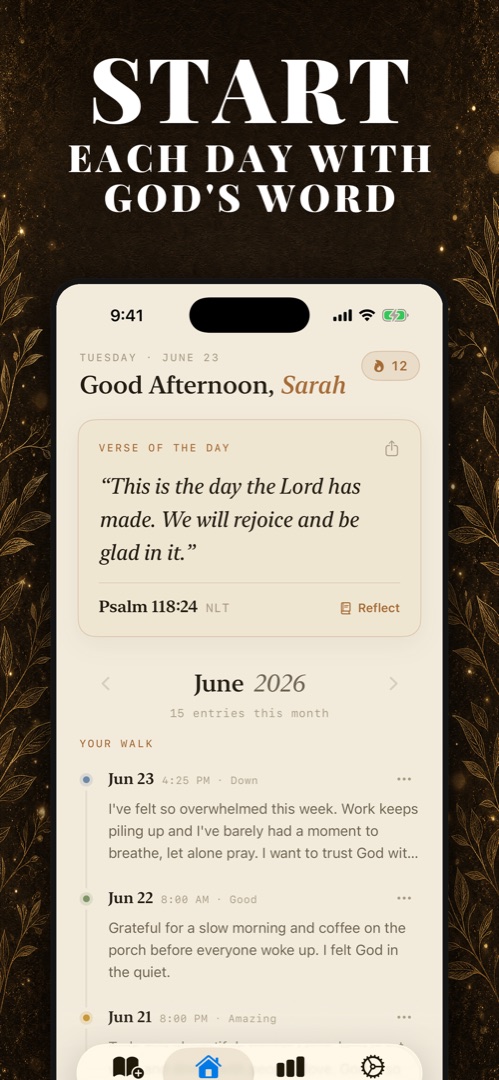
Most verse widgets rotate through a generic list. Walk With Jesus works differently: your Verse of the Day is the verse from your own journal — the one that answered what you wrote most recently. You can also pin any past entry's verse as your Verse of the Day. The widget stops being decoration and becomes a bookmark in your actual walk with God.
In the Walk With Jesus app
Six widgets, one personal verse
Write about your day, receive a verse chosen for your words, and it flows straight to your Lock Screen and Home Screen — in the app's warm Paper or Night look. Start each day with God's Word before the notifications get you.
Widget not updating? Two quick fixes
- Open the app once a day at first. iOS budgets background refresh for new apps; opening the app guarantees today's verse is loaded.
- Check Settings → General → Background App Refresh and make sure it's allowed for your Bible app.

God's Word, first thing you see
Download Walk With Jesus free, journal one honest sentence, and put the verse that answers you on your Lock Screen.
Download on theApp StoreFree download · Private by design · English & Español